
2025-07-02 GraphRAG实践
发布于 2025年07月02日 • 5 分钟 • 991 字
Table of contents
GraphRAG刚出来的时候,使用的是OpenAI的对话模型和向量模型,由于在过程中会使用非常多的调用,所以成本较为昂贵。如果想用便宜的国产大模型或者在本地部署,免费使用,那就涉及到本地模型的使用。 使用其他模型有很多种方式,可以用ollama, slang, vllm,text-generations等方式部署。 GraphRAG改版非常多次,在1.0.0版本不支持使用本地模型,在最新的2.0.0以上的版本开始支持ollam部署的模型。 如果要用OpenAI之外的对话模型和向量模型,建议详细阅读:https://github.com/microsoft/graphrag/issues/657。
我本次用的是ollama部署的qwen2:7b和本地部署的embedding模型。
提前准备
1. 安装环境
conda create -n graphrag3.10 python=3.10
oonda activate graphrag3.10
2. 准备好ollama模型
ollama run qwen2:7b
使用步骤
1. 下载graphrag
git clone git@github.com:microsoft/graphrag.git
cd graphrag
pip install -e.
2. 初始化
准备数据输入文件夹
mkdir -p ./graphrag_sophia/input # 注意一定要建立一个input子文件夹,在创建索引的时候会去识别这个名字。如果是其他名字,可以在settings.yaml更改
初始化
python -m graphrag init --root ./graphrag_sophia
可以看见在graphrag_sophia下生成settings.yaml和prompts文件夹。 这一步还需要把要把*.txt文件放入input文件夹中
3. 生成索引
3.1 准备数据 先准备数据,在graph_rag文件夹新建input,将.txt文件放进去。如果手头没有.txt文件,可以用官方提供的文件。 mkdir -p ./input (注意一定要建立一个input子文件夹,在创建索引的时候会去识别这个名字。如果是其他名字,可以在settings.yaml更改)
curl https://www.gutenberg.org/cache/epub/24022/pg24022.txt -o ./data/test/book.txt
3.2 设置workspace variables
我在查阅资料的过程中,发现很多人的settings.yaml是这样的:
llm:
model: qwen2:7b
api_base: http://127.0.0.1:11434/v1
model_supports_json: false
max_tokens: 32768
在配置这一步卡了很久,反复报错。原因是新版必须包含三个字段:default_chat_model、type和api_key。官网没给示例,我试了很多写法都不对,估计是因为版本差异。现在我的解决方式是:在.env和settings.yaml里分别设置api_base和api_key。
我这里的设置:在.env文件中GRAPHRAG_API_KEY=<API_KEY> settings.yaml文件:
### This config file contains required core defaults that must be set, along with a handful of common optional settings.
### For a full list of available settings, see https://microsoft.github.io/graphrag/config/yaml/

### LLM settings ###
## There are a number of settings to tune the threading and token limits for LLM calls - check the docs.

models:
  default_chat_model:
    type: openai_chat # or azure_openai_chat
    api_base: http://127.0.0.1:11434/v1
    auth_type: api_key # or azure_managed_identity
    api_key: ollama # set this in the generated .env file
    model: qwen2:7b
    encoding_model: cl100k_base # automatically set by tiktoken if left undefined
    model_supports_json: true # recommended if this is available for your model.
    concurrent_requests: 25 # max number of simultaneous LLM requests allowed
    async_mode: threaded # or asyncio
    retry_strategy: native
    max_retries: 10
    tokens_per_minute: auto              # set to null to disable rate limiting
    requests_per_minute: auto            # set to null to disable rate limiting
  default_embedding_model:
    type: openai_embedding # or azure_openai_embedding
    api_base: http://127.0.0.1:8005/api/v1
    auth_type: api_key # or azure_managed_identity
    api_key: ollama
    model: bge
    encoding_model: cl100k_base # automatically set by tiktoken if left undefined
    model_supports_json: true # recommended if this is available for your model.
    concurrent_requests: 25 # max number of simultaneous LLM requests allowed
    async_mode: threaded # or asyncio
    retry_strategy: native
    max_retries: 10
    tokens_per_minute: auto              # set to null to disable rate limiting
    requests_per_minute: auto            # set to null to disable rate limiting

### Input settings ###

input:
  type: file # or blob
  file_type: text # [csv, text, json]
  base_dir: "input"

chunks:
  size: 200 #1200
  overlap: 50 # 100
  group_by_columns: [id]

### Output/storage settings ###
## If blob storage is specified in the following four sections,
## connection_string and container_name must be provided

output:
  type: file # [file, blob, cosmosdb]
  base_dir: "output"

cache:
  type: file # [file, blob, cosmosdb]
  base_dir: "cache"

reporting:
  type: file # [file, blob, cosmosdb]
  base_dir: "logs"

vector_store:
  default_vector_store:
    type: lancedb
    db_uri: output\lancedb
    container_name: default
    overwrite: True

### Workflow settings ###

embed_text:
  model_id: default_embedding_model
  vector_store_id: default_vector_store

extract_graph:
  model_id: default_chat_model
  prompt: "prompts/extract_graph.txt"
  entity_types: [organization,person,geo,event]
  max_gleanings: 1

summarize_descriptions:
  model_id: default_chat_model
  prompt: "prompts/summarize_descriptions.txt"
  max_length: 500

extract_graph_nlp:
  text_analyzer:
    extractor_type: regex_english # [regex_english, syntactic_parser, cfg]

cluster_graph:
  max_cluster_size: 10

extract_claims:
  enabled: false
  model_id: default_chat_model
  prompt: "prompts/extract_claims.txt"
  description: "Any claims or facts that could be relevant to information discovery."
  max_gleanings: 1

community_reports:
  model_id: default_chat_model
  graph_prompt: "prompts/community_report_graph.txt"
  text_prompt: "prompts/community_report_text.txt"
  max_length: 2000
  max_input_length: 8000

embed_graph:
  enabled: false # if true, will generate node2vec embeddings for nodes

umap:
  enabled: false # if true, will generate UMAP embeddings for nodes (embed_graph must also be enabled)

snapshots:
  graphml: false
  embeddings: false

### Query settings ###
## The prompt locations are required here, but each search method has a number of optional knobs that can be tuned.
## See the config docs: https://microsoft.github.io/graphrag/config/yaml/#query

local_search:
  chat_model_id: default_chat_model
  embedding_model_id: default_embedding_model
  prompt: "prompts/local_search_system_prompt.txt"

global_search:
  chat_model_id: default_chat_model
  map_prompt: "prompts/global_search_map_system_prompt.txt"
  reduce_prompt: "prompts/global_search_reduce_system_prompt.txt"
  knowledge_prompt: "prompts/global_search_knowledge_system_prompt.txt"

drift_search:
  chat_model_id: default_chat_model
  embedding_model_id: default_embedding_model
  prompt: "prompts/drift_search_system_prompt.txt"
  reduce_prompt: "prompts/drift_search_reduce_prompt.txt"

basic_search:
  chat_model_id: default_chat_model
  embedding_model_id: default_embedding_model
  prompt: "prompts/basic_search_system_prompt.txt"
3.2 生成索引 这个过程非常非常慢,且token的消耗巨大。(在chunk_length为100的情况下,final_documents每100个14分钟,extract_graph一个小时进度35%)
运行这个的前提是数据放在graph_rag/input下,在graph_rag下运行
python -m graphrag index –root .\graphrag_sophia
看到这个说明索引建立是ok的。
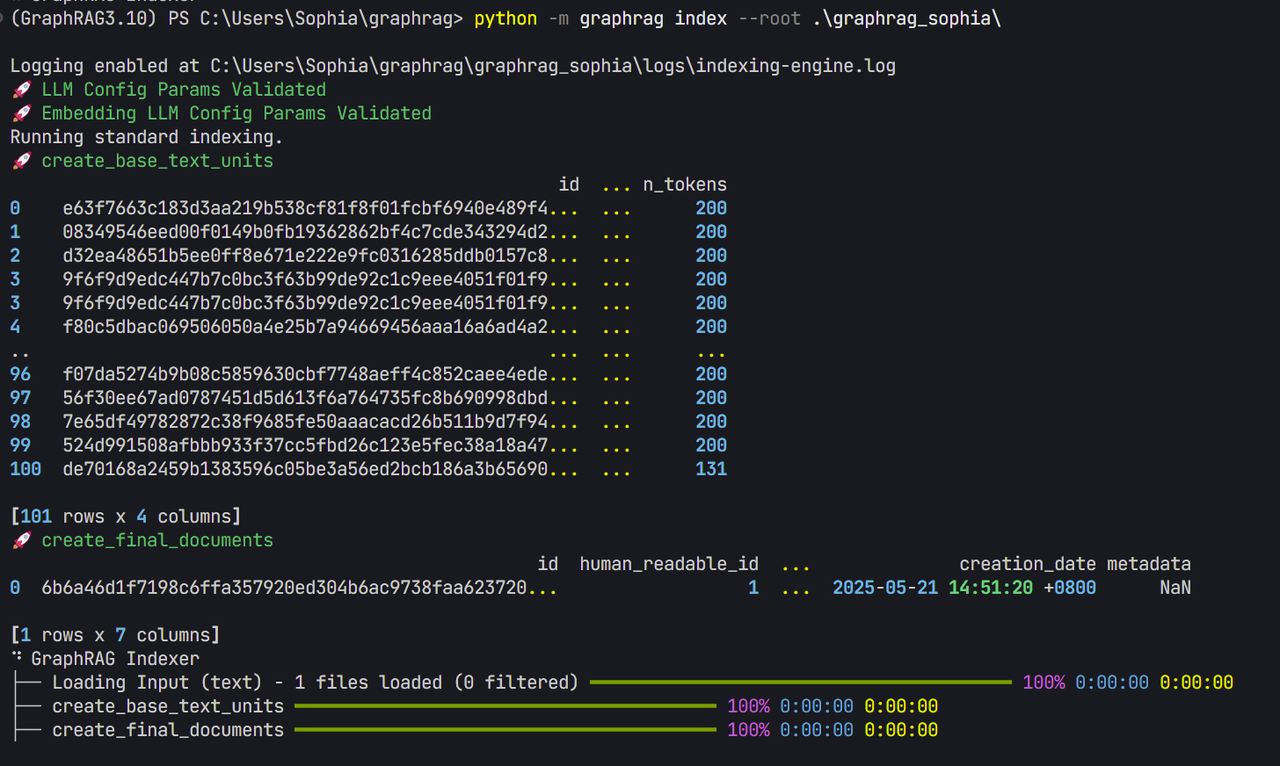
如果这一步有问题,说明api_base有可能出错,对于ollama来说,model的后缀需要去掉,或者从api改为v1。对于本地部署的embedding模型来说,embedding的后缀也要去掉。另外,不能用ollama来运行bge-m3,原因在这:https://segmentfault.com/a/1190000046497918。
如果有错误,可以到ollama的 view logs和 graphrag\graphrag_sophia\logs\indexing-engine.log查看日志。
3.3 查询 查询有三种,lcoal search, global search以及drift search
graphrag query --root .\graphrag_sophia --method global --query "Please introduce the Forbidden City"
结果
Warning: All map responses have score 0 (i.e., no relevant information found from the dataset), returning a canned 'I do not know' answer. You can try enabling `allow_general_knowledge` to encourage the LLM to incorporate relevant general knowledge, at the risk of increasing hallucinations.

SUCCESS: Global Search Response:
I am sorry but I am unable to answer this question given the provided data.
当method为local的时候
INFO: Vector Store Args: {
"default_vector_store": {
"type": "lancedb",
"db_uri": "C:\\Users\\Sophia\\graphrag\\graphrag_sophia\\output\\lancedb",
"url": null,
"audience": null,
"container_name": "==== REDACTED ====",
"database_name": null,
"overwrite": true
}
}

SUCCESS: Local Search Response:
The Forbidden City, officially known as the Palace Museum, is a historic palace complex located in the heart of Beijing, China. It was constructed during the Ming dynasty (1406-1420) and served as the imperial palace for 24 emperors over the course of the Ming and Qing dynasties (1368-1912). The Forbidden City covers an area of approximately 720,000 square meters and is surrounded by a large moat.

The complex is divided into two main sections: the Outer Court and the Inner Court. The Outer Court was where the emperor conducted official business and received foreign dignitants, while the Inner Court was reserved for the imperial family's private life, including the emperor, empresses, concubines, and their children.

The Forbidden City is renowned for its grand architecture, which showcases traditional Chinese building styles with intricate details such as roof tiles decorated with dragons, phoenixes, and other mythical creatures. The palace buildings are arranged in a symmetrical layout, reflecting the imperial ideology of harmony and balance.

Today, the Forbidden City serves as a museum that houses over 1 million artifacts and artworks from various dynasties. It is one of the most visited tourist attractions in China and is recognized as a UNESCO World Heritage Site for its cultural significance and historical value. The palace complex not only preserves the legacy of ancient Chinese architecture but also provides insights into the imperial lifestyle, court rituals, and the political structure of the Ming and Qing dynasties.

Visitors can explore various halls, palaces, gardens, and courtyards within the Forbidden City, each with its own unique history and stories. Some notable structures include the Hall of Supreme Harmony (Zhonghe Dian), the Hall of Central Harmony (Zhongheng Dian), the Hall of Earthly Tranquility (Taixing Dian), and the Palace of Heavenly Purity (Tianqing Gong). The palace also hosts special exhibitions that showcase Chinese art, calligraphy, ceramics, and other cultural treasures.
上面只是原生的GraphRAG,可以看出可以优化的地方非常多。首先,Global search结果为空,其次GraphRAG 支持语言为英文,需要改为中文,另外速度太慢也是问题。